Showing posts with label Artificial Intelligence. Show all posts

May 7, 2026

Building Site-Aware Enterprise AI Agents on Microsoft 365 Using Claude Agent SDK

Introduction

An enterprise running seven department-specific SharePoint intranet sites needed AI that could actually operate within their systems - not just answer questions about them. Here is what a single task looked like before we got involved - and after.

Before - Sales proposal workflow After - same task, one sentence
Open Pipeline Tracker on SharePoint - find the deal Type: "Draft a proposal for XYZ Corp's cloud migration deal and send it to their CTO."
Switch to Client Contacts - find the CTO's email Agent queries Pipeline Tracker - pulls deal value, stage, scope notes
Open Word - hunt for the proposal template on the shared drive Agent looks up CTO in Client Contacts - name, email, title
Manually fill in deal value, scope, and terms Branded proposal generated from python-docx template and uploaded to Sales Collateral
Save, switch back to SharePoint, upload to Sales Collateral library Email compose panel opens - pre-filled with CTO's address, subject, and body
Open Outlook - type the CTO's email, write the body, attach, send Review, tweak one line, hit Send
40 minutes  ·  6 applications  ·  1 task One sentence  ·  Five systems  ·  Done

We assessed the organisation's requirements against Copilot Cowork and Claude Cowork. Both are genuinely capable products - but neither could query custom SharePoint list schemas, connect to a SQL employee database, generate documents from branded templates, or switch to a different specialist persona depending on which department site the user was on. They needed something those products are structurally not built to do.

Same panel. Same backend. Same LLM. Completely different specialist per site, loaded at runtime from a JSON manifest. This is what we built. Here is how:

The Architecture in One Sentence

A single SPFx floating panel on every SharePoint page sends messages to a FastAPI backend, which enters a Claude agentic loop with a filtered set of MCP tools - filtered by which site the user is on, what they are allowed to do, and which department's data model applies. Each site loads its own agent persona, slash commands, and skill files - deep knowledge modules that teach the agent how a specific department's data is structured, what business rules apply, and which workflows exist.

System Architecture diagram

System Architecture - SPFx panel → FastAPI backend → Claude agentic loop → MCP server → enterprise data sources

That sentence hides a lot of machinery. Three decisions do most of the work: how each site loads its own specialist, how authentication is split between reads and writes, and how the agentic loop orchestrates everything in between. Let me walk through each.

Decision 1: The Plugin Manifest

When a user opens the Sales site and the panel initialises, the backend resolves their session: who are they (from the OBO token), which site are they on (from the site_url passed by the frontend), and what can they do (from the plugin manifest). The manifest is a single JSON file:

{
  "name": "sales",
  "display_name": "Sales Assistant",
  "entry_agent": "agents/sales-assistant.md",
  "connectors": ["sharepoint", "msgraph", "email", "docgen", "ems",
    "knowledge", "analytics", "automation"],
  "commands": ["commands/pipeline-report.md", "commands/add-lead.md", ...],
  "skills": ["skills/pipeline-management/SKILL.md",
    "skills/client-engagement/SKILL.md", ...],
  "sharepoint_lists": {
    "lists": {
      "Pipeline Tracker": "columns: OpportunityName, DealValue, PipelineStage, ..."
    }
  }
}

This manifest does five things at session start:

It loads a persona.

The entry_agent points to a markdown file that defines the agent's personality, role, behaviour rules, and domain expertise. The Sales agent is "friendly, professional, and results-driven." The Finance agent is precise and compliance-aware. The People agent is warm and policy-oriented. Same LLM, different specialist.

It filters the tool palette.

The connectors array controls which of the 58 MCP tools appear in Claude's tool list for this session. Sales gets SharePoint, Graph, Email, DocGen, EMS, Knowledge, Analytics, and Automation - but not Azure DevOps. Delivery gets Azure DevOps too. Technology gets everything. The LLM only sees tools it is allowed to use.

It loads skill files.

This is where the deep domain knowledge lives. Each skill is a markdown file that describes how a specific aspect of the department works. The Sales plugin has skills for pipeline management, client engagement, and competitive intelligence. A skill might describe how the Pipeline Tracker list is structured, what each column means, which OData filters produce useful results, what "stalled deal" means in this organisation's context, and what steps the agent should follow for a pipeline review. Skills are loaded into the system prompt based on the site and the user's query - they are the agent's domain training, delivered at runtime through text, not fine-tuning.

It injects list schemas.

The sharepoint_lists block is injected into the system prompt. This is how the agent knows the column is called PipelineStage, not Stage. It knows DealValue is the field for revenue, not Value or Amount. It never guesses. If a column is not in the manifest, the agent cannot reference it.

It registers slash commands.

Each command is a markdown file with trigger phrases, required parameters, the agent to hand off to, and step-by-step instructions. When a user types /pipeline-report, the command's markdown gets injected into the system prompt for that turn.

Plugin-Per-Site Architecture diagram

Plugin-Per-Site Architecture - 7 sites, auto-discovered, manifest-driven, session-filtered

The consequence of this design is that adding a new department - an eighth site, a regional hub, a project workspace - requires creating one folder with one JSON manifest and a few markdown files. No code changes. No backend redeployment. The registry discovers it on next restart.

The key insight: The plugin folder is the architecture. Not the LLM, not the framework, not the cloud infrastructure. The entire system's behaviour - which specialist responds, which tools are available, which data is accessible, which commands exist, which domain knowledge the agent draws on - is determined by which plugin.json file gets loaded and which skill files sit alongside it. Everything else is shared plumbing. This is what makes the system maintainable at scale: changing a department's AI behaviour is editing a JSON file and a few markdown documents, not shipping code.

Decision 2: Dual-Auth and the Invisible Session

Authentication is where most custom AI implementations get it wrong. Either they use the user's token for everything (writes are unauditable and tied to individual permissions) or they use an app-only token for everything (losing the identity context of who asked for the action).

We split it:

Reads use the user's delegated OBO token.

When the agent queries a SharePoint list or fetches calendar events, it does so as the user. If the user cannot see a site, neither can the agent. The existing M365 permission model is preserved - no data leakage, no privilege escalation.

Writes use an app-only certificate token.

  • All write operations - list item creation, document upload, email send - execute through a controlled service identity, not the user's token.
  • Every write is routed through an audit logger: who requested it, what changed, tool name, payload, status, and duration.
  • site_url, OBO token, app-only token, and the user's permission set are never parameters the LLM sees - they are injected from the session object before the agentic loop begins.

In the initial version, SharePoint tools accepted site_url as a tool parameter. During early integration testing, Claude hallucinated a URL - it substituted the Sales site URL when a user on the Finance site asked about budget items. The query returned nothing. The agent confidently reported "no budget items found." It was a silent, plausible failure - the worst kind. We refactored site_url out of every tool interface within the day and moved it to session-level injection. The LLM never sees it, never chooses it, never hallucinates it.

If the LLM does not need a value to reason about the task, do not put it in the tool interface. Every parameter visible to the LLM is a surface for hallucination. Session-level injection eliminates that surface.

Decision 3: The Agentic Loop

When a user sends a message, the backend does not call Claude once and return the answer. It enters a loop:

Agentic Loop diagram

Agentic Loop - Request Lifecycle with tool execution feedback loop

  • Multi-step tool chains. A single message like "find stalled deals, draft follow-ups, and notify the sales lead" triggers five sequential tool calls - SharePoint OData query, EMS employee lookup, three email draft preparations - each feeding the next decision.
  • Real-time status streaming. Each tool call emits an SSE event to the frontend ("Fetching list data: Pipeline Tracker...", "Looking up employee...") so the user sees the agent working, not a loading spinner.
  • Model is a config variable. Claude Sonnet is the default - fast enough for real-time streaming, capable enough for multi-step orchestration. Swapping models is a single environment variable change; the architecture is not coupled to any provider.
  • We tested Azure OpenAI + Semantic Kernel. The loop runs and tools get called. But in head-to-head testing, Claude produced fewer hallucinated tool parameters, followed complex multi-step prompts more faithfully, and handled branching logic - where a tool result determines whether to call the next tool or skip to a different action - more consistently. That is why it is our default.

What the Agent Can Actually Do

58 tools across 9 connectors. Here are the ones that matter most to daily operations:

Connector What it does Available on
SharePoint Read list items with OData filters, create and update items, browse document libraries, upload files, search across the site. Primary data layer. All sites
EMS Direct SQL via pyodbc against the HR database: employee lookup, org chart traversal, leave balances, skills search, project assignments, team allocation, capacity planning, budget tracking. No REST wrapper. All sites
Document generation Branded offer letters, proposals, and reports via python-docx. Budget workbooks via openpyxl. Generated on the backend, uploaded to SharePoint, download card in chat. Sales, People, Finance, Operations
Email Two-step workflow: agent drafts, human reviews in inline compose panel, then confirms Send. Never auto-sends. All sites
Azure DevOps Query and create work items, get sprint status. Delivery, Technology only
Proactive alerts Five APScheduler handlers: stalled deals, budget thresholds, expiring contracts, onboarding gaps, morning brief digest. Push to Teams channels and notification bell before anyone opens a browser. All sites (handler-specific)
MS Graph Users, calendar, Teams channels, mail integration. All sites
Analytics Natural language reports, anomaly detection. All sites
Knowledge Federated search, expert finder. All sites

Lessons from the Build

Every implementation surfaces lessons that inform the next one.

SharePoint field name complexity runs deeper than expected.

Display names and internal names diverge in non-obvious ways. "Status" might be stored as BudgetStatus. "Details" might be AnnouncementDetails. The initial deployment surfaced field name mismatches that cost debugging cycles. Our fix - a PowerShell schema export script that generates verified field mappings per site - is now a standard first step in our deployment methodology.

Not every data source needs an API layer.

Our first design had a full REST API wrapper around the SQL employee database. We replaced it with direct pyodbc queries wrapped in the MCP tool contract. Simpler, faster, easier to maintain.

The in-process MCP server will need extraction.

Running the tool server in-process was the right call for initial development - no serialisation overhead, easy debugging. But for production scale, tool execution needs to run independently so long-running operations (document generation, cross-site searches) do not block the API layer. The architecture was designed for this extraction - MCP's HTTP transport makes it a configuration change, not a rewrite - which is planned for the next phase.

Retry logic is now day-one infrastructure.

Claude's API occasionally returns transient errors under load. Without exponential backoff (1s, 2s, 4s), these surface as user-facing failures. Retry logic is now part of our standard agentic infrastructure from the start, based on this experience.

Production hardening - monitoring, observability, error recovery, and scale testing - deserves its own post. We will publish that next.

A Note on Portability

This case study uses SharePoint as the enterprise platform and Claude as the LLM, but the pattern is platform-agnostic. The same plugin-per-site architecture has been applied with Confluence, custom intranets, and internal portals. The frontend can be any web surface that supports a JavaScript embed - the SPFx panel is one implementation, not a requirement. The connectors, the plugin manifest pattern, the dual-auth model, and the session-scoped tool filtering are all transferable. If your organisation runs on a different stack, the architecture adapts to it.

Conclusion

The plugin-per-site pattern, dual-auth model, session-scoped tool filtering, and in-process MCP server described here form a reusable enterprise architecture - not a one-off implementation. Adding a new department means creating a folder with a JSON manifest and a few markdown skill files. No code changes, no redeployment. The system's behaviour is entirely determined by configuration, not by the codebase.

This architecture was designed and deployed by Binary Republik. It is adaptable to any organisation's departmental structure, data model, and governance requirements - and transferable to any enterprise platform with programmatic APIs.

If you have any questions you can reach out to our AI Consulting team here.

February 13, 2026

Big Data Analytics Powered by AI: Platforms, Use Cases, and Enterprise Value

Introduction

Every organization at present is encircled by a vast quantity of data. Data from Logs, transactions, user interactions, sensor readings data is being generated continuously. The real challenge is no longer how much data we have, but how quickly and intelligently we can use it.

This is where Big Data Analytics Platforms powered by AI become relevant. Through the integration of extensive data processing with Artificial Intelligence and Machine Learning(AI/ML), these platforms assist organizations in advancing beyond mere dashboards and reports to proactively respond to future events in real time.

Why AI and Big Data Work So Well Together

Big Data platforms are excellent at handling scale, but scale alone doesn't create value. AI adds the intelligence layer learning from patterns, adapting to change, and making predictions that humans simply can’t compute manually.

The Platforms Powering AI-Driven Analytics

Apache Spark: Velocity at Volume

Apache Spark has emerged as a fundamental element of contemporary analytics due to its ability to swiftly and effectively handle large datasets. Its capability to manage batch processing, real-time streams, and machine learning tasks makes it well-suited for predictive analytics.

Teams use Spark to analyze historical data, train models, and even generate near-real-time predictions whether that’s forecasting demand or identifying unusual behavior in transaction data.

Databricks: A Hub for Data Team Collaboration

Databricks builds on Spark, but focuses on simplifying the entire analytics and AI lifecycle. It brings data engineers, data scientists, and analysts onto a single collaborative platform.

What distinguishes Databricks is its ability to integrate Data processing, Machine learning, and deployment all in a single platform. Rather than managing various tools, teams can concentrate on experimenting, learning, and deploying models more quickly without the concern of infrastructure complications.

Hadoop: The Core Remains Important

Hadoop might not be the primary tool individuals consider for AI currently, yet it continues to hold significant importance. Numerous organizations depend on Hadoop.

That historical data is incredibly valuable for training predictive models. In many real-world architectures, Hadoop acts as the backbone for long-term storage, while newer tools like Spark and Databricks handle AI-driven analytics on top of it.

TensorFlow: Bringing Intelligence to the Data

TensorFlow is where advanced AI truly comes alive. It enables teams to build and train Machine learning and Deep learning models that can learn complex patterns far beyond what traditional analytics can uncover.

From time-series forecasting to image and text analysis, TensorFlow integrates seamlessly with Big Data platforms and cloud infrastructure, allowing models to scale as data grows.

Cloud Platforms: Scaling Without Limits

Cloud platforms have dramatically transformed the deployment of AI and Big Data. Teams can concentrate on resolving issues rather than handling servers and clusters.

  • AWS offers powerful services for large-scale data processing and machine learning, making it easier to go from raw data to production-ready models.
  • Azure shines in enterprise environments, offering strong governance, security, and seamless integration with analytics and AI tools.
  • Google Cloud Platform(GCP) brings an AI-first approach, with highly optimized services for analytics and machine learning at scale.

The cloud makes predictive analytics elastic, cost-effective, and globally accessible.

Frequently Asked Questions

FAQ 1: What distinguishes traditional analytics from AI-based Big Data analytics?

Reports and dashboards that provide descriptive insights and historical data are the main focus of traditional analytics. By employing machine learning models to anticipate future events, identify trends automatically, and facilitate real-time decision-making, AI-driven Big Data analytics takes one step further.

FAQ 2: What makes Apache Spark so popular for predictive analytics?

Fast and scalable, Apache Spark can handle batch and streaming data. It is perfect for training and implementing predictive models on big datasets because of its in-memory processing and integrated machine learning libraries.

FAQ 3: In what ways can Databricks streamline operations for AI and ML?

Teams working in machine learning, data science, and data engineering can collaborate on a single platform offered by Databricks. It makes infrastructure less complicated and speeds up teams' transition from unprocessed data to models that are ready for production.

FAQ 4: How does cloud computing fit into analytics powered by AI?

Cloud systems provide worldwide availability, managed services, and elastic scaling. This makes predictive analytics more affordable and accessible by enabling businesses to run sizable AI workloads without having to maintain on-premise infrastructure.

FAQ 5: What abilities are necessary to operate on Big Data platforms powered by AI?

Data engineering, distributed systems, SQL, Python, machine learning principles, and familiarity with cloud platforms are essential competencies. Additionally, it is becoming more and more crucial to comprehend MLOps and model monitoring.

Conclusion

Platforms for Big Data analytics powered by AI are transforming how organizations perceive data. Rather than relying solely on data to comprehend past events, companies can now predict results, mitigate risks, and make more informed decisions instantly. Technologies like Apache Spark, Databricks, Hadoop, and TensorFlow integrated with cloud services such as AWS, Azure, and GCP form a robust environment where data and intelligence collaborate.

November 23, 2023

Unlocking the Power of Azure AI Language Service: A Comprehensive Overview and Document Summarization

Introduction:

In the ever-evolving world of artificial intelligence, Azure AI Language Service stands out as a formidable tool that promises to revolutionize the way we interact with and analyze textual content.


This article will dive you into the depths of Azure AI Language Service, offering a comprehensive overview and insight into its capabilities. Also we will witness the magic of document summarization in a small yet powerful React application.


This interactive experience will showcase how seamlessly Azure AI Language Service integrates with modern web technologies, providing a practical demonstration of its capabilities using Natural Language Processing (NLP) features for understanding and analyzing text.

Prerequisites:

  • Azure Subscription - Create free subscription from here.

  • NodeJS Installed on Machine (Tested on Node.js 16.19.0)

Azure AI Language Service: Unleashing Its Power:

Azure AI Language is a cloud-centric solution offering Natural Language Processing (NLP) capabilities for text comprehension and analysis. Using this service we can develop smart applications that manipulate textual content. Here is a complete overview of what the Language service can do with its powerful features:


Named Entity Recognition (NER): It spots entities like names, events, places, and dates from the text with named entity recognition.


Personally identifying (PII) and health (PHI) information detection: Detect and hide sensitive info like phone numbers, email addresses, and IDs in text with PII detection.


Language detection: Figure out the language of a document and get a language code with language detection that works for many languages and variations.


Sentiment Analysis and opinion mining: Learn what people think about our topic with sentiment analysis and opinion mining. These features analyze text to discover positive or negative feelings and link them to specific aspects.


Summarization: Generate document or conversation summaries using summarization, Which extracts key sentences to capture the most crucial information from the original contents


Key phrase extraction: It identifies and lists the main concepts in text with key phrase extraction, a preconfigured feature.


Explore additional features and functionalities within the Language service in this documentation available here. Let’s gain insights into the Summarization feature within the Language Service and integrate it into our compact React application.


Azure AI Language Service: Document Summarization:

In today's fast-paced and information-rich world, the need for efficient content processing has become paramount. Summarization plays a crucial role in addressing this need by distilling lengthy and complex information into concise and digestible forms.

Summarization constitutes one of the capabilities provided by Azure AI Language, a suite of cloud-based machine learning and AI algorithms tailored for crafting intelligent applications centered around written language.

Document summarization employs natural language processing techniques to create a condensed version of a document. The API supports two main approaches to automatic summarization: extractive and abstractive.

Extractive: Selects and extracts sentences directly from the original content that collectively capture the most crucial information.

Abstractive: Creates a summary by generating concise and coherent sentences or words, not limited to extracting sentences from the original document. This approach aims to provide a shortened version of lengthy content.

Let’s create an instance of the Language service to showcase practical summarization and seamlessly integrate it into our React application.

Follow Below Steps to Create an Instance of Language Service:

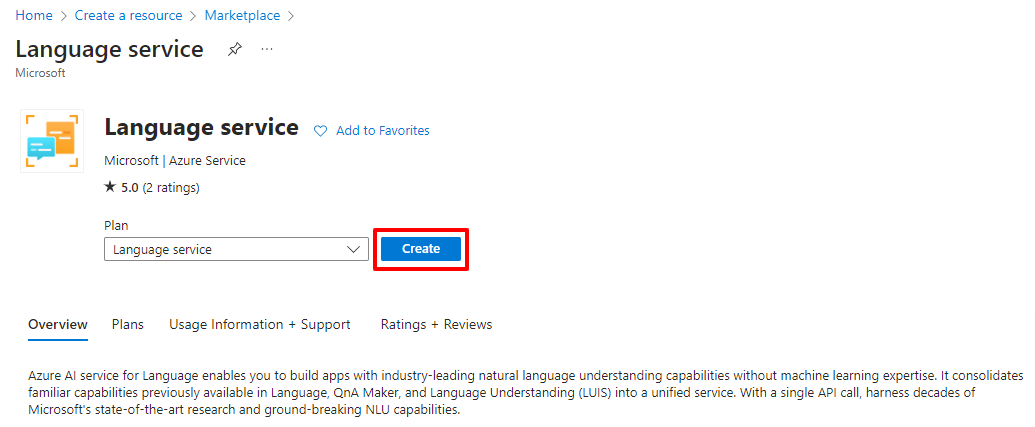
  • To Create Instance, log in to your Azure Subscription, go to “Create a resourceand type for language.


  • Click on Create and then Continue to Create your resource at bottom.

  • Fill all the Details with Name of the Instance and Resource. (You can use the free pricing tier (Free F0) to try the service, and upgrade later to a paid tier for production.)

  • Click on Next Until Review and Create tab.

  • Verify all the Details and then Click on Create.


After creating the service instance, review the details in the resource group. To utilize the Language service,
Now will obtain Endpoints and an API key by accessing the Language Studio through this link. Login using the Azure Subscription in which you created the instance.

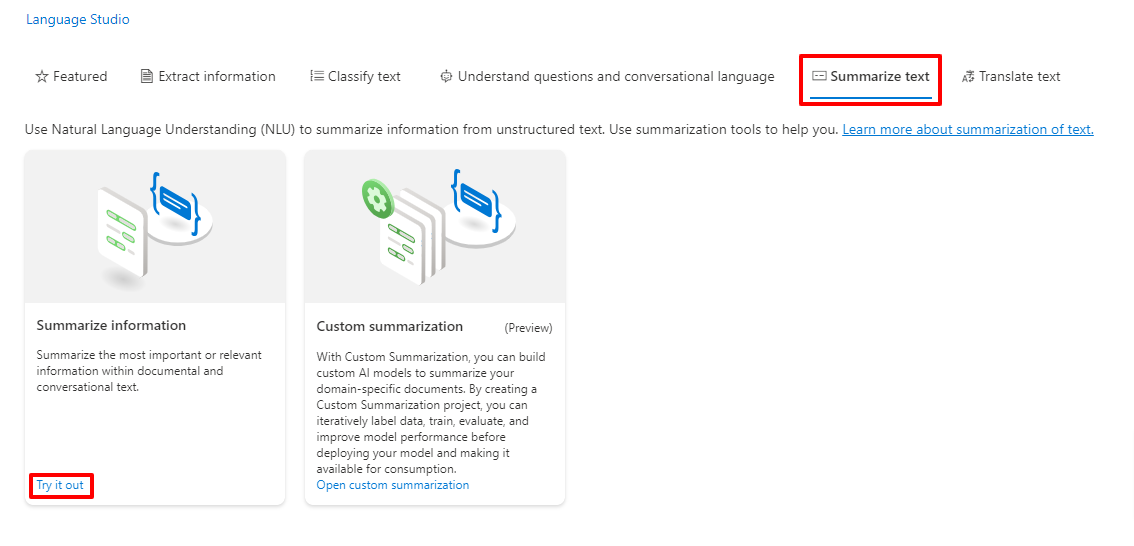
Navigate to the Summarization text tab within Language Studio and choose the "Summarize Information" option.


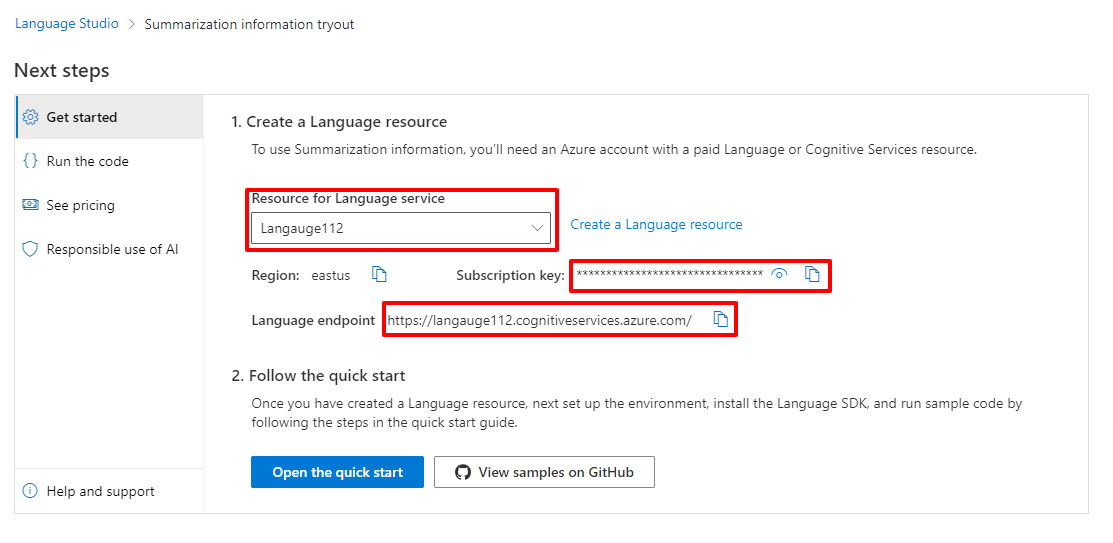
Now you can explore summarization directly in the Playground or seamlessly integrate it into our application using the provided Endpoints and API Key at bottom. Scroll to the bottom to find Language endpoints and Subscription Key. Ensure you have chosen the correct Resource for the Language service.


Copy the Subscription Key and Endpoint URL; we will utilize them in our React project.

Setting Up a React Application for Azure Language Service Integration:

The API, along with the obtained Endpoints from the above step, can be employed in various frontend applications. However, for demonstration purposes, we will utilize them in the React app.

Follow below steps to Create the React app and Install all the Packages needs in order to Integrate this:

Note: Ensure that your local development machine has Node version 14 or higher.


  • Run the "npx create-react-app document-summarize" command to set up the scaffolding for the React app.

  • Then Install the Client Package Library “npm install --save @azure/ai-language-text@1.1.0” in order to work with Azure AI Language.

  • Now open the Project in the VS Code.

  • Create a .env file in the root folder.

  • Store the EndPoint and APIKey in it as shown below.


  • Navigate to App.js file in the Folder.

  • Replace the Code with below code.


import React, { useState } from 'react';
const { AzureKeyCredential, TextAnalysisClient } = require("@azure/ai-language-text");

const endpoint = process.env.REACT_APP_ENDPOINT;
const apiKey = process.env.REACT_APP_APIKEY;

function App() {
  const [loading, setLoading] = useState(false);

  // In Order to Generate the Download Link of the File
  const download = async(filename, text) => {
    var previousElement = document.getElementById('downloadLink')
    if(previousElement){
      document.body.removeChild(previousElement);
    }
    var element = document.createElement('a');
    element.setAttribute('id', "downloadLink");
    element.setAttribute('href', 'data:text/plain;charset=utf-8,' + encodeURIComponent(text));
    element.setAttribute('download', filename);
    var linkText = document.createTextNode("Download the summarized version of the file");
    element.appendChild(linkText);
    document.body.appendChild(element);
  }

  // In Order to Handle the Input element
  const handleFileChange = async (event) => {
    setLoading(true)
    const file = event.target.files[0];
    var input = event.target;
    var reader = new FileReader();
    reader.onload = async function () {
      var text = reader.result;
      await analyzeAndSummarizeText(file.name,text)
      setLoading(false)
    };
    reader.readAsText(input.files[0]);
  };

  // Analyze and Summarize the Text
  const analyzeAndSummarizeText = async (inputFileName, originalText) => {
    const client = new TextAnalysisClient(endpoint, new AzureKeyCredential(apiKey));
    const actions = [
      {
        kind: "ExtractiveSummarization",
        maxSentenceCount: 2,
      },
    ];
    const analyzeBatch = await client.beginAnalyzeBatch(actions, [originalText], "en");
    analyzeBatch.onProgress(() => {
      console.log(
        `Last time the operation was updated was on: ${analyzeBatch.getOperationState().modifiedOn}`
      );
    });
    const results = await analyzeBatch.pollUntilDone();
    for await (const actionResult of results) {
      if (actionResult.kind !== "ExtractiveSummarization") {
        throw new Error(`Expected extractive summarization results but got: ${actionResult.kind}`);
      }
      if (actionResult.error) {
        const { code, message } = actionResult.error;
        throw new Error(`Unexpected error (${code}): ${message}`);
      }
      for (const result of actionResult.results) {
        console.log(`- Document ${result.id}`);
        if (result.error) {
          const { code, message } = result.error;
          throw new Error(`Unexpected error (${code}): ${message}`);
        }
        let summarizedTextContent = result.sentences.map((sentence) => sentence.text).join("\n");
        await download(inputFileName, summarizedTextContent);
      }
    }
  };

  return (
    <div id="inputFile">
      <input type="file" onChange={handleFileChange} />
      {
        loading && <p>Summarizing the document please wait a while...</p>
      }
    </div>
  );
}

export default App;

Save the files, then run "npm start" to initiate the development server on port 3000 and test the solution. Upload the document and wait briefly for the generation of the summarized version. Once ready, click the download link to retrieve the summarized version.

Output:


Conclusion:

Throughout this article, we explored the capabilities of Azure AI Language Service, delving into its features and functionality. Specifically, we seamlessly integrated the Document Summarization feature of the Language service into a React application. By doing so, we harnessed the power of Azure AI Language Service to enhance document processing in a practical and user-friendly manner.

If you have any questions you can reach out our SharePoint Consulting team here.

September 1, 2023

ChatGPT Code Interpreter: Revolutionizing How We Write and Understand Code

In the digital age, the intersection of Artificial Intelligence (AI) and coding has given rise to powerful tools that transform the way we approach programming. Among these, the ChatGPT Code Interpreter stands out as a remarkable innovation. If you've ever wondered, "Is there a way for AI to help me understand or write code?", or "How can I simplify the coding process with the help of AI?", you're in the right place.

Dive into the world of ChatGPT Code Interpreter and discover how it's making waves in the programming landscape.

Discover the power of AI in coding with the ChatGPT Code Interpreter. Whether you're a seasoned developer or just starting, see how AI can revolutionize your coding experience.

What is AI?

Artificial Intelligence, commonly referred to as AI is a branch of computer science that aims to create machines that can perform tasks that typically require human intelligence. These tasks include problem-solving, understanding natural language, recognizing patterns, and making decisions. With advancements in machine learning and neural networks, AI systems like ChatGPT are now capable of mimicking human thought processes to an unprecedented degree.

Why Use the ChatGPT Code Interpreter?

  1. Efficiency: No more endless hours of debugging. The Code Interpreter can assist in identifying and suggesting fixes for your coding challenges.
  2. Learning: Whether you're a beginner trying to understand a complex code snippet or an expert seeking to optimize your code, ChatGPT offers insights and explanations tailored to your needs.
  3. Collaboration: Sharing code with peers? ChatGPT can act as a mediator, interpreting and explaining code segments for better team understanding.
  4. Versatility: From Python to JavaScript, the Code Interpreter is designed to understand and assist with a wide range of programming languages.

The most recent Code Interpreter ChatGPT model has new functionalities that prior AI models lacked. OpenAI has done an excellent job of allowing you to run Python inside of ChatGPT to perform interactive tasks. This blog serves as a reference for Code Interpreters.

According to OpenAI's website, the code interpreter is a new experimental model of ChatGPT as a completely new model. In this blog, I'll describe and demonstrate how it allows you to upload files and run code in a Python Sandbox. People are already utilizing it to create games in minutes, map the population density of the country by ZIP code, and even create pretty good diagrams for statistics and information based on Excel spreadsheets.

It can now do a few more things, such as use Python, upload files, and download files. 

So, how does this new model run code? 

Python exists in a sandbox, allowing it to be firewalled and then executed inside of a temporary region. This means that this version of ChatGPT can do Maths, which was one of the most significant restrictions of prior versions.

How to enable ChatGPT Code Interpreter?

Let's give it a shot. It has been enabled for all Premium Subscribers. Go to Settings, then to Beta features, then tick the code interpreter to make it available under GPT4 from the drop-down list.


Different ways to use Code Interpreter

Create Graphical Representations: 

First, I requested it "generate a graphical depiction of Pi". It doesn't only tell me what pi is; it also tries to run it in a code sandbox. Unfortunately, the initial attempt fails, but because this model is intelligent, it can detect when it fails. 
I told it to utilize Python libraries this time, and it did. The end result is this diagram, which is exactly what I was searching for. I can go back and look at the Python code; it imports a library; the code is clean and well-marked; and I could copy and paste it directly into an application.


Mathematical Calculations: 

You can ask mathematical calculations such as "How long would it take to drive to the nearest city from New Delhi at 100 kilometers per hour?" ChatGPT Code Interpreter identifies each city and its distance then develops a formula to calculate how long it would take vs. the distance. I double-checked this on Google, and it was mostly correct.


Work with files: 

The next amazing feature is the ability to upload files. You can upload nearly anything as long as it is 100 MB or less. In this scenario, I'll attach a PDF invoice for the product as well as a document for the product module. I can then ask queries such as, "What is this PDF about?" or "How much tax I have paid for this product?" or "Explain to me the Purpose of the module."


Analyzing Excel files or CSVs, is one of the nicest things that Code Interpreter can do. I attempted to upload a large CSV file and asked some interesting questions, such as how to create a bar chart. This is the stage where ChatGPT can conduct some pretty fantastic data analysis using spreadsheets like this.


Image Editing: 

Another function of the new ChatGPT Code Interpreter model is the ability to upload, access, and alter photos. I'm going to submit a photo and ask if it can recognize the face and its location in the photo. Python is being used to do this activity. There are Python packages for stuff like face detection that it can utilize to locate the face. It did an excellent job with the red square around the face in the supplied image. Then I asked it to crop around the face so I could make an avatar, and it could do that as well.


The ChatGPT Code Interpreter isn't just another tool; it's a testament to how AI is reshaping our approach to coding. For professionals, hobbyists, and learners alike, this AI-powered assistant offers an unparalleled blend of guidance, interpretation, and optimization. If you're on the fence about integrating AI into your coding journey, remember that in the world of programming, staying ahead means embracing the future. And the future is undeniably intertwined with AI.

There are numerous methods to use the OpenAI Code Interpreter. If I missed any, please feel free to add the same in the comments section.

If you have any questions you can reach out our SharePoint Consulting team here.